
Array Languages #24: Broadcasting, When Shapes Meet
2089 words • 11 min read • Abstract

Episode 4 of my video series on array programming is about what happens when two arrays meet. Episode 3 gave every array a shape, a rank and axes. Add two arrays, and the question is what their shapes have to do with each other. Array languages answer it in different ways, and this episode compares them.
| Resource | Link |
|---|---|
| Video | Broadcasting: When Array Shapes Meet: Array Languages #4 |
| All the videos | X_eTaL-video’s page |
| Try X_eTaL | In your browser |
| Code | X_eTaL, X_eTaL-video |
| The series | Array Languages: every post |
| Comments | Discord |
A single value
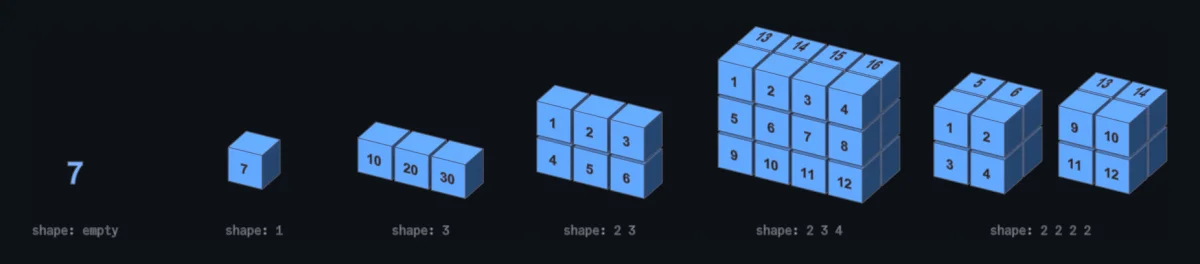
Start with a single value and a vector. One plus the vector adds one to every item: the single value extends to each item. This is called scalar extension.
v ← 10 20 30
1 + v   ⍝ 11 21 31
It works with any shape. Ten times a matrix multiplies every item by ten, and the result has the matrix’s shape. As in episode 3, results are shown boxed, the way xetal --box draws them:
M ← 2 3 r̲eshape r̲ange 6
10 × M
┌→───────┐
↓10 20 30│
│40 50 60│
└~───────┘


The same shape, or an error
Two arrays of the same shape combine item by item: each item meets the item in the same place.
1 2 3 + v   ⍝ 11 22 33
M + M
┌→──────┐
↓2  4  6│
│8 10 12│
└~──────┘
Now try the matrix and the vector. M has shape 2 3 and v has shape 3. In X_eTaL that is an error, and the message names both shapes:
M + v
error[shape-mismatch]: shapes differ: 2 3 and 3
So the whole rule in X_eTaL fits in three lines: one value extends to every item, the same shape goes item by item, and any other shapes are an error.
Why an error?
The rule is short, so a result is easy to predict. A mismatch is often a mistake, and an error shows it at once, naming both shapes. To combine other shapes, you say how.
Saying how
To add the vector to each row, say so. r̲eshape repeats the vector to the matrix’s shape, and then the shapes match:
M + 2 3 r̲eshape v
┌→───────┐
↓11 22 33│
│14 25 36│
└~───────┘
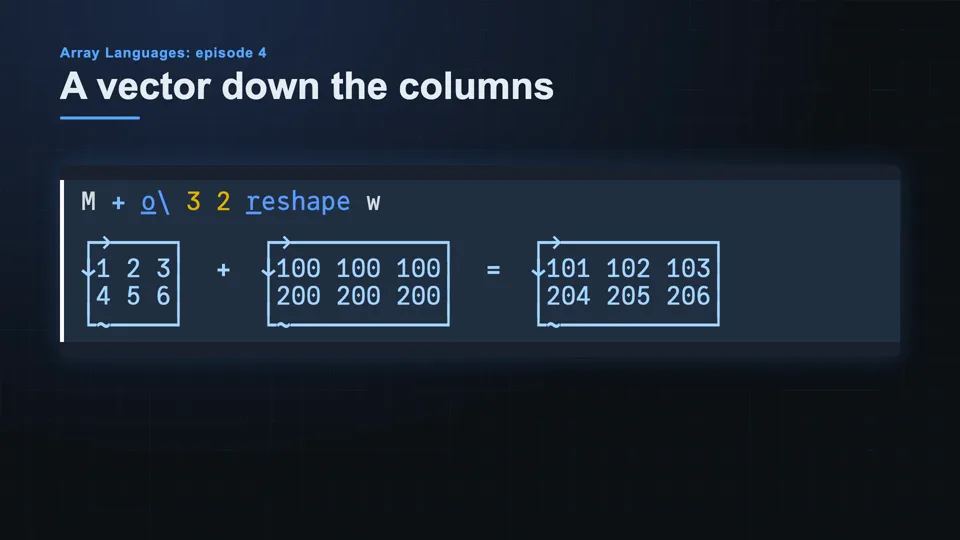
Columns take one more step. w has two values, one for each row: reshape it to three by two, then transpose, and each row holds one value. The sum adds one value along each row, so each column gets the same two values:
w ← 100 200
M + o̲\ 3 2 r̲eshape w
┌→──────────┐
↓101 102 103│
│204 205 206│
└~──────────┘
The rank form says the row case another way. The 1 means each row of the matrix, and the small function in braces adds the vector to its argument, ⍵ (a later episode covers functions like this one):
1 '{ ⍵ + v } r̲ank M
┌→───────┐
↓11 22 33│
│14 25 36│
└~───────┘
And sometimes you want every pair. t̲able combines each item of one vector with each item of the other, so three values and two values give a three by two result:
v '+ t̲able w
┌→──────┐
↓110 210│
│120 220│
│130 230│
└~──────┘
Other array languages
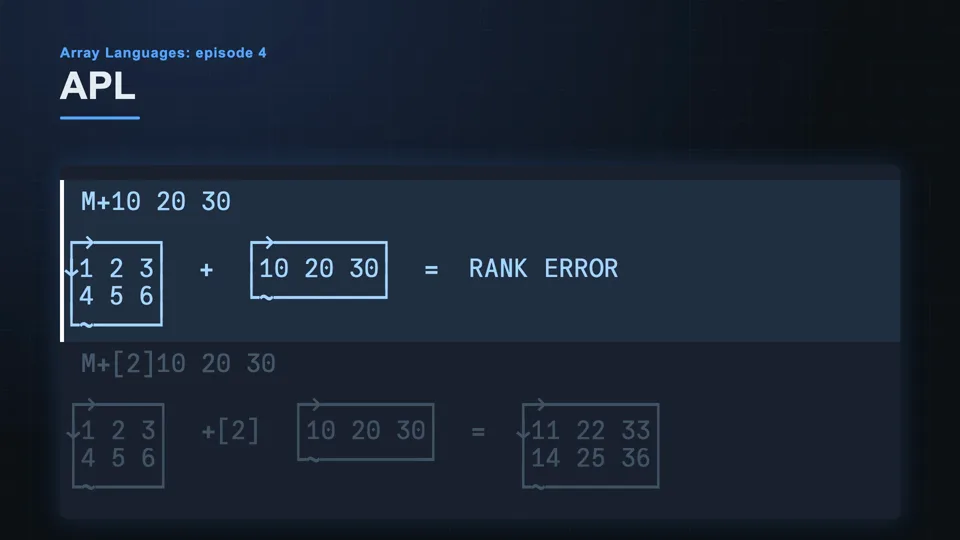
Other array languages draw this line in different places. M has two rows and three columns, so three values match its last axis and two values match its first:
| Language | Matches | M + 10 20 30 |
M + 100 200 |
|---|---|---|---|
| X_eTaL | the same shape | error | error |
| APL | the same shape | error | error |
| J, BQN | axes from the front | error | 100 to the first row, 200 to the second |
| K | axes from the front (a matrix is a list of rows) | error | 100 to the first row, 200 to the second |
| NumPy | axes from the back | 10 20 30 to each row | error |
Every one of them extends a single value. Each also has its own way to say how:
- APL: both lines are a rank error, since the ranks differ. An axis number in brackets says how: plus on axis 2 puts the vector on each row, and on axis 1 two values go down the columns. The rank operator is another way; rank 1 pairs the vector with each row.
- J: two values meet the two rows, one value each, and three values are a length error. To put three values on each row, J uses rank: rank 1 means each row.
- BQN follows the same rule as J, and its rank modifier works the same way.
- K: a matrix is a list of rows, so two values meet the two rows. “Each right” puts three values on each row.
- NumPy: three values meet each row with nothing to add, and two values are an error. To go down the columns, add an axis of length one: the two values become a column, and that column stretches across the matrix.
That stretching has a cost. A column of three plus a row of three gives a three by three table. If you meant item by item, there is no error; you get an answer of the wrong shape.
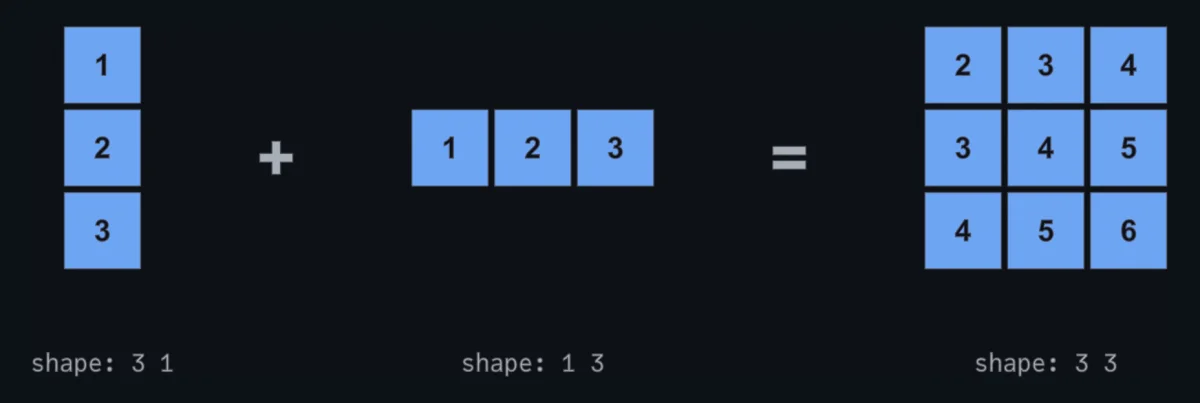
The same table in X_eTaL, step by step
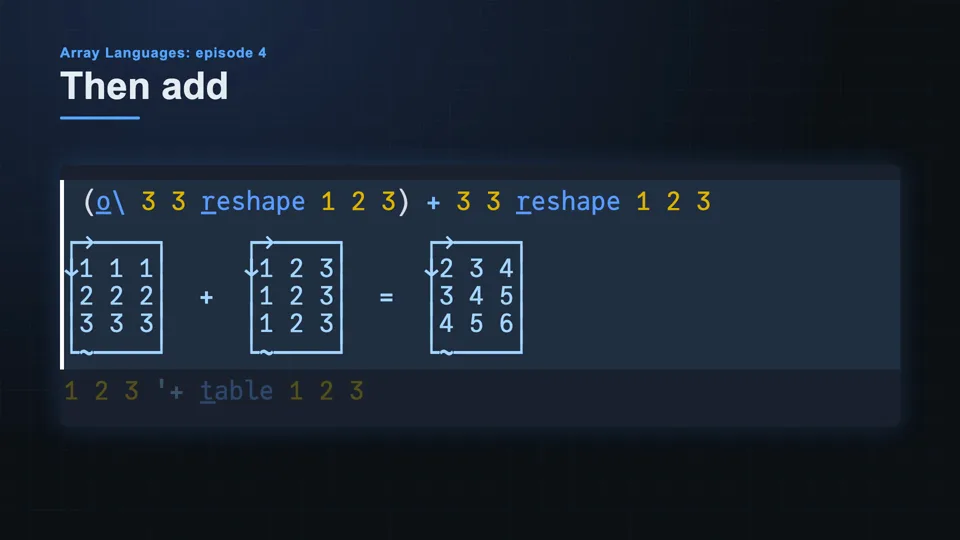
In X_eTaL nothing stretches by itself. A column plus a row is an error, because the shapes differ:
(3 1 r̲eshape 1 2 3) + 1 3 r̲eshape 1 2 3
error[shape-mismatch]: shapes differ: 3 1 and 1 3
So we stretch each one ourselves. Reshape repeats the row three times, down the rows; reshape and transpose repeat the column across. Now both are three by three, and plus adds them item by item. The result is the same table that NumPy gave:
(o̲\ 3 3 r̲eshape 1 2 3) + 3 3 r̲eshape 1 2 3
┌→────┐
↓2 3 4│
│3 4 5│
│4 5 6│
└~────┘
t̲able does it in one step, and gives the same box: 1 2 3 '+ t̲able 1 2 3.
The trade-off
Each choice has a cost. Automatic rules are short to write, but a wrong shape can still give an answer. A strict rule asks for one more step, and in return a mismatch shows itself.
Coming up, and an exercise
The next episode is about array idioms: thinking without loops. It takes small problems and solves each one twice, first with a loop, then with whole arrays.
Before then, try this in the browser editor. Make a times table for one to nine with t̲able. Then add ten, twenty and thirty to each row of a matrix, and one hundred and two hundred to each column. (To type it, use the ASCII it is drawn from: := for ←, r_eshape for r̲eshape, * for ×, _r for ⍵.)
Closing
One thing I find interesting when studying a language is learning its idioms: the short, familiar phrases experienced programmers reach for without thinking. Each language in this episode has its own idiom for “add this to each row”, and the next episode introduces some more X_eTaL idioms.
Part 24 of the Array Languages series. View all parts
Comments or questions? SW Lab Discord or YouTube @SoftwareWrighter.