
Personal Software #10: A Sudoku That Teaches You the Strategies
1186 words • 6 min read • Abstract
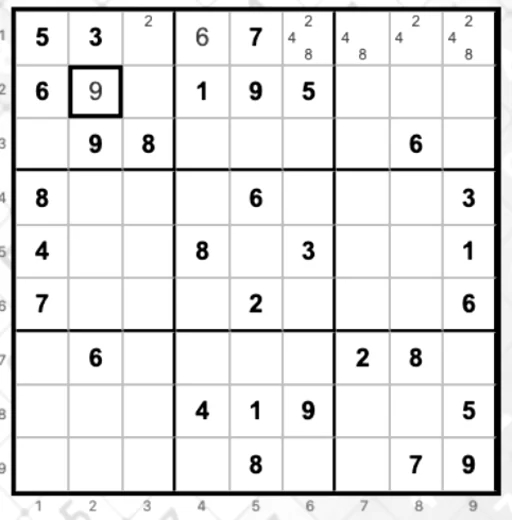
| Resource | Link |
|---|---|
| Play | sw-fun.github.io/sudoku |
| Repository | sw-fun/sudoku |
| Difficulty evidence | docs/difficulty-stats.md |
| Offline / phone install | docs/offline-use.md |
| Comments | Discord |
TL;DR
| What | Learn/Practice Sudoku — browser Sudoku in Rust, Yew, and WASM. No ads |
| Play it | https://sw-fun.github.io/sudoku/ — installable as a PWA, works offline once installed |
| Learn mode | Lists every strategy applicable to the current board and walks each one step by step with animated highlighting |
| Show me mode | The game solves the board itself, explaining one strategy at a time; falls back to an explained trial placement so even Hardest boards finish |
| Notes | Three-state pencil marks — off, user-entered, app-filled — with fill, clear, hide, auto-prune |
| Engine | Seeded generator that digs clues only while uniqueness holds; a grader that scores by hardest technique required |
| Built | 2026-08-18 to 2026-08-26, 87 commits, now v0.7.2 |
The game part
Play with the on-screen pad or the keyboard: 1–9 places a digit, spacebar, Backspace or Delete erases. Five difficulty levels. The board has row and column coordinate labels, the digit pad grays out digits already placed nine times, and where the input pad sits — above the board, below it, or as a per-cell popup keypad — is configurable.
Around that: save and resume, a guard against starting a new game over one in progress, an abandon confirmation, a running tally, a help overlay, and a clock. It is a Progressive Web App, so it installs on a phone home screen and runs offline afterwards.
The engine underneath
The generator is seeded and deterministic. A SplitMix64 stream fills a complete grid, then clue digging removes cells only while the puzzle still has exactly one solution — uniqueness is checked with a solution counter capped at 2, which is all you need to distinguish “one” from “more than one”. Point symmetry is optional.
Difficulty is not a clue count. A grader runs the human techniques as a chain of responsibility, cheapest first, and scores the puzzle by the hardest technique it actually required, times 100, plus how many applications it took. That gives disjoint score bands:
| Band | Hardest technique required |
|---|---|
| 100–299 | Singles |
| 300–399 | Locked candidates |
| 400–599 | Naked and hidden subsets |
| 600–699 | XY-wing |
| 700–799 | Fish (X-wing, swordfish) |
| 800+ | Bounded trial |
The engine then generates against a target band with a clue window per level, and fails closed rather than shipping a puzzle outside its band.
The measured result, from a seeded run that reproduces exactly:
| Level | Band | Mean score | Clues |
|---|---|---|---|
| Easy | 100–299 | 147 | 44 |
| Medium | 300–399 | 356 | 28 |
| Hard | 400–599 | 469 | 26–27 |
| Harder | 600–799 | 660 | 26–27 |
| Hardest | 800+ | 924 | 24–25 |
Mean scores strictly increase across levels, so an easy board is never harder than a hard one at the sampled operating point. Every sampled puzzle has exactly one solution; every easy sample needed only naked or hidden singles; every hardest sample needed trial. Generation stays interactive — the worst level averaged 162 ms per accepted puzzle.
The solver is deterministic backtracking with most-constrained-cell selection, and solves AI Escargot in under two seconds.
The part I actually wanted
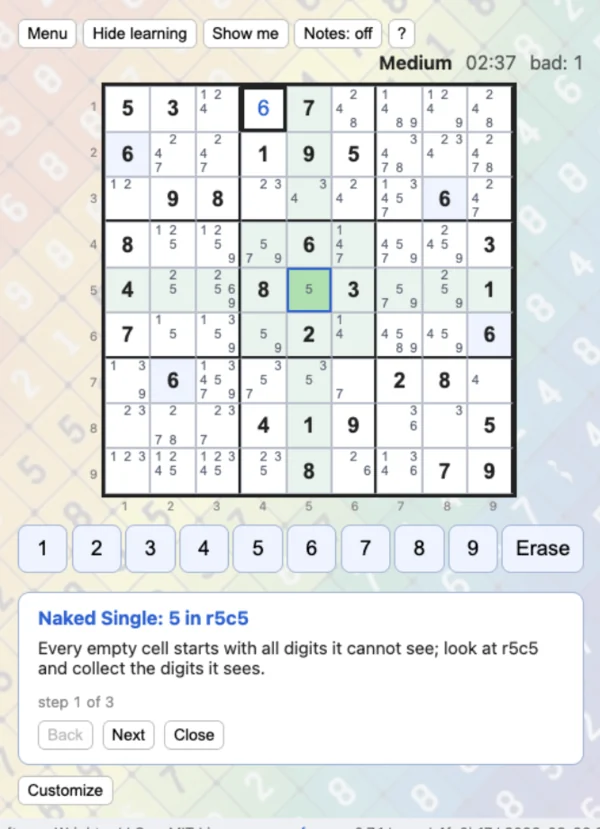
Learn mode looks at the live board and lists every strategy currently applicable to it — singles, pointing and claiming, naked and hidden pairs, X-Wing, XY-Wing — then walks whichever you pick, step by step. The highlighting does the explaining: pattern cells outlined, the involved rows, columns and blocks tinted, eliminated candidates pulsing red with a strike-through, placements pulsing green.
That is the difference from reading about a technique. The board in front of you is the example, and the strategy is shown where it applies rather than in an abstract diagram.
Show me mode hands the board to the game, which solves it while explaining one strategy at a time. It runs automatically with a speed selector — 1s, 3s, or 6s, with a manual Next that pauses — or step by step. When the taught techniques run out, it explains a trial placement instead of stopping, so even a Hardest board solves to the end rather than dead-ending at the limit of the curriculum.
Notes, after feedback
Pencil marks arrived after user feedback, and then kept going for several versions. They ended up three-state: off, user-entered, and app-filled, so your own notes stay distinguishable from candidates the app worked out. Strategy walkthroughs can Apply their eliminations into the notes, or Apply all, or Reset.
The cleanup pass added a pencil toggle, fill, clear, hide, and auto-pruning of notes invalidated by a placement. A later fix made wrong guesses spare the notes rather than clearing work you had done.
How it was built
Development is saga-driven with AgentRail and TDD, decomposed into component workspaces following the sw-MLPL pattern: each components/* directory is its own cargo workspace of small crates, sharing one root target/ and a global build lock.
| Workspace | Contents |
|---|---|
engine |
Grid model, solver, generator, techniques, advanced techniques, grader, and the engine facade |
tutor |
Annotated strategy finders — the same techniques, but reporting why and where so the UI can narrate them |
ui |
Yew/WASM frontend: board rendering, input, stats, persisted game state |
uikit |
Pure UI kit over plain data with no browser types — input placement, keypad geometry and enablement, time formatting — kept decoupled from game state so it can be tested |
The tutor split is what made teaching possible: the engine’s job is to decide a puzzle’s difficulty, while the tutor’s job is to produce an explanation with the cells and candidates attached.
Eighty-seven commits between 2026-08-18 and 2026-08-26 took it from an empty workspace to v0.7.2. The site is built locally and pushed as a bundle; there is no CI build step.
Bottom line
It has helped me solve harder Sudoku puzzles faster.
Part 10 of the Personal Software series. View all parts | Next: Part 11 →
Comments or questions? SW Lab Discord or YouTube @SoftwareWrighter.