
Array Languages #20: A Ray Tracer in X_eTaL, on CPU and GPU
1618 words • 9 min read • Abstract
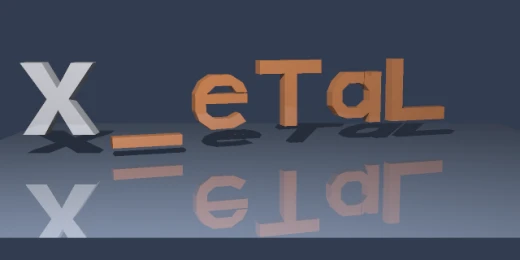
X_eTaL-gpu runs X_eTaL source on the GPU by lowering it through an intermediate form to OpenCL. A ray tracer is a good test of that: lots of independent pixels, the same arithmetic for each, and a picture at the end that shows at a glance whether it worked. In two days, on Arch Linux, it went from a plan to the picture here.
| Resource | Link |
|---|---|
| Live demos | Scene/logo, RayTrace/diagnostic, Glass/example |
| Ray tracing on the GPU | X_eTaL-gpu (site), repository |
| The libraries | X_eTaL-libraries: Vector3, Extrusion, Scene, RayTrace, Glass |
| The plan | docs/ray-tracing-plan.md |
| Earlier | Array Languages #7: X_eTaL-gpu |
| The series | Array Languages: every post |
| Comments | Discord |
The first time
I first used ray tracing in the mid-1990s, to make animated fly-throughs around shiny spheres and through pipes; I was the lead developer on IBM’s BatchPipes/MVS at the time. I was also a big user of TSO Pipelines and CMS Pipelines, so I had pipes on my mind. It ran on a CPU, and generating the animation frames was not quick. This time the same kind of rendering is array code, and the question is how much a GPU changes that.
The rules
The renderer is ordinary X_eTaL array code: camera rays, intersections, the nearest hit, normals, lighting, shadows, reflections and pixel values. The host only supplies arrays, picks the device, runs it and writes files. There is no host implementation of the renderer, no Blender, and no outside rendering engine.
The GPU path is X_eTaL-gpu’s existing one, source to intermediate form to OpenCL, on an RTX 5060 Ti. OpenCL compute does not use the card’s RT cores, and none of this needs CUDA or OptiX. POV-Ray is a reference for what a ray tracer can do, but nothing is copied from it.
Libraries first
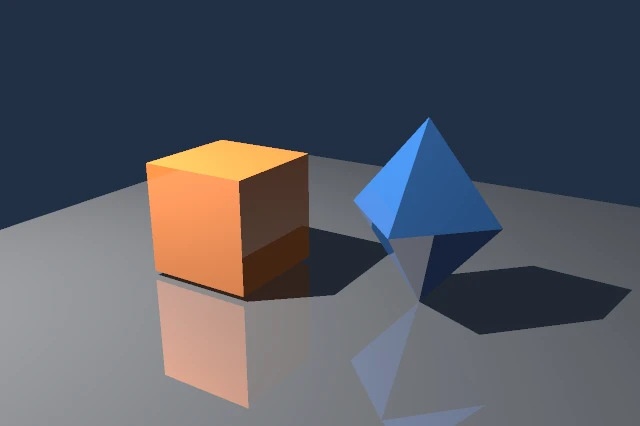
The reusable parts went into X_eTaL-libraries as requests the GPU repository filed and the libraries delivered, in order: 3D vector math (Vector3), contour extrusion with original letter shapes (Extrusion), named scene arrays and rigid group animation (Scene), the opaque ray tracer itself (RayTrace), sphere geometry, bounded glass transport (Glass), and then sampling, thin lenses and area lights.
The live demo site now opens with a gallery of the finished scenes. Each library has a live demo with a recorded render above an editable program. Run computes a quick version in the browser; the recorded image is a slower offline render of the same scene at full size.
Glass
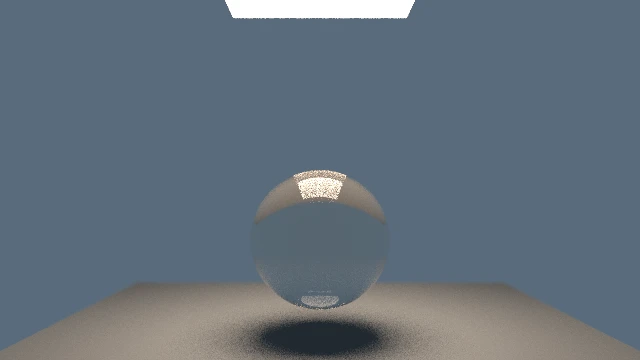
A glass sphere under an area light, with a thin-lens camera and 64 samples per pixel. Glass is the slow case: light refracts and reflects at each surface, so every pixel follows a path, capped at 16 bounces here, and the area light makes the shadow soft. Even 64 samples leave some noise around the glass and the shadow; images like this take hours on the CPU, which is why they are rendered offline.
As of today, glass runs on the GPU too: refraction, reflection, total internal reflection and absorption, from the same shared library code, through X_eTaL-gpu’s OpenCL path. Small test renders with paths capped at two and at four bounces match between the CPU and the RTX; a first 1024 by 768 glass preview of three spheres and three crystals has run on the RTX, at about 8.4 s per render once prepared after more than eight minutes of cold setup, but at one sample per pixel it still shows unresolved paths. A clean version is next, along with faster cold shader compilation.
The logo, on CPU and on GPU
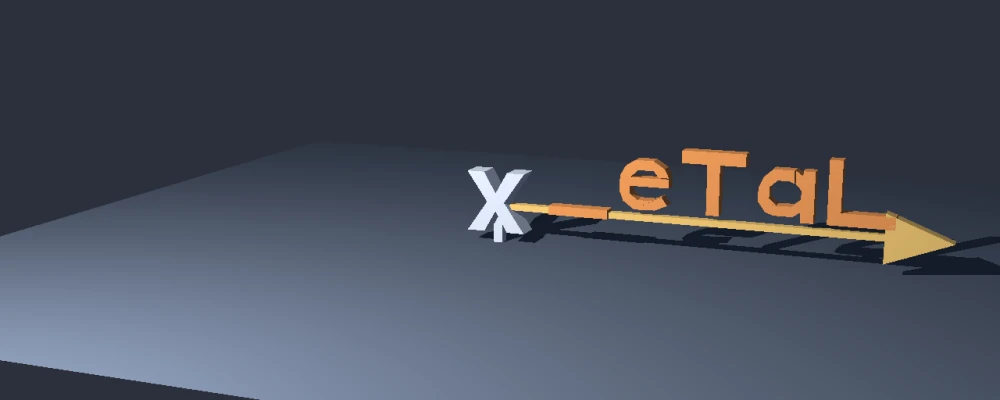
The scene became a weather vane: the X fixed on its post, and the letters _eTaL along a shaft and arrow. The same 1280 by 512 frame, one sample per pixel:
| Where | Time | |
|---|---|---|
| CPU | X_eTaL’s evaluator, 32 strips on four workers | about 10 minutes (607 s wall) |
| GPU | RTX 5060 Ti through OpenCL, second run with the scene already on the card | about 1.2 s (0.89 s on the device) |
The GPU’s first run spent about five seconds on setup. These are single observations, not a benchmark, and the two renders used different library revisions, so the repository makes no speedup claim from them; a matched comparison is still to come. What has been matched is correctness: the same generated program at 8 by 4 agrees with the evaluator to better than 1.7e-7, and the 4 by 4 diagnostic matches exactly on the CPU and to within 1e-5 on the RTX.

On Apple Silicon
The same sources run on my M1 Max, through Apple’s OpenCL 1.2, which has no 64-bit floating point.
- The same pixels. At 16 by 8, the M1 Max output is byte for byte the RTX’s. At 1280 by 512 the two cards differ in 53 of 655,360 pixels, all at silhouette edges or along the vane’s shadow boundary, where a hit or shadow test lands within 32-bit rounding of a surface and the two vendors’ arithmetic decides it differently. To the eye the images are the same.
- Speed. At 1280 by 512, with the scene already prepared, the M1 Max took about 0.9 s against the RTX’s 1.2 s. At 16 by 8 it was eighteen times slower, 74 ms against 4.1 ms, because a tiny image measures the cost of launching about 1,500 kernels, and Apple’s driver charges more per launch. Cold setup is Apple’s translation of the generated code: 11.8 s the first time, about 3 s after that.
- CPU against GPU, on one machine. The first matched comparison, the 640 by 256 logo: X_eTaL’s evaluator on the CPU took 476 s on eight workers; the GPU took about 0.2 s per render once prepared, and 4.5 s for the whole process. The CPU side is 64-bit and the GPU 32-bit, so this is not a strict speedup, but it shows the size of the gap.
- No glass yet. The Glass library checks its unit vectors to tolerances that only 64-bit arithmetic can meet, so on the M1 Max it correctly stops at its first check. Running glass there needs a library change: a tolerance that follows the data’s precision.
The two cards’ programs also came from different revisions of the GPU backend, which plans many more kernel launches now than when the RTX stills were made, so none of these numbers is final.
Measuring it honestly
Pictures are compared pixel by pixel, with stated tolerances, never by eye. Timings separate setup, device time and the whole run, and file writing is left out. The outputs are uncompressed TIFF and lossless PNG, with the exact source of every render kept beside it.
Closing
In the 1990s my fly-throughs took a CPU a long time per frame. Thirty years later the same kind of picture comes from an array language, and the frame that took ten minutes on the CPU takes about a second on a GPU, on a Linux box or my Mac, with the same picture on both.
Next are a clean, larger glass still, glass on Apple Silicon, a matched CPU-against-GPU benchmark, and the weather vane turning at full size.
Part 20 of the Array Languages series. View all parts
Comments or questions? SW Lab Discord or YouTube @SoftwareWrighter.