
Array Languages #27: Reading and Writing X_eTaL, the Whole Syntax on One Page
6332 words • 32 min read • Abstract
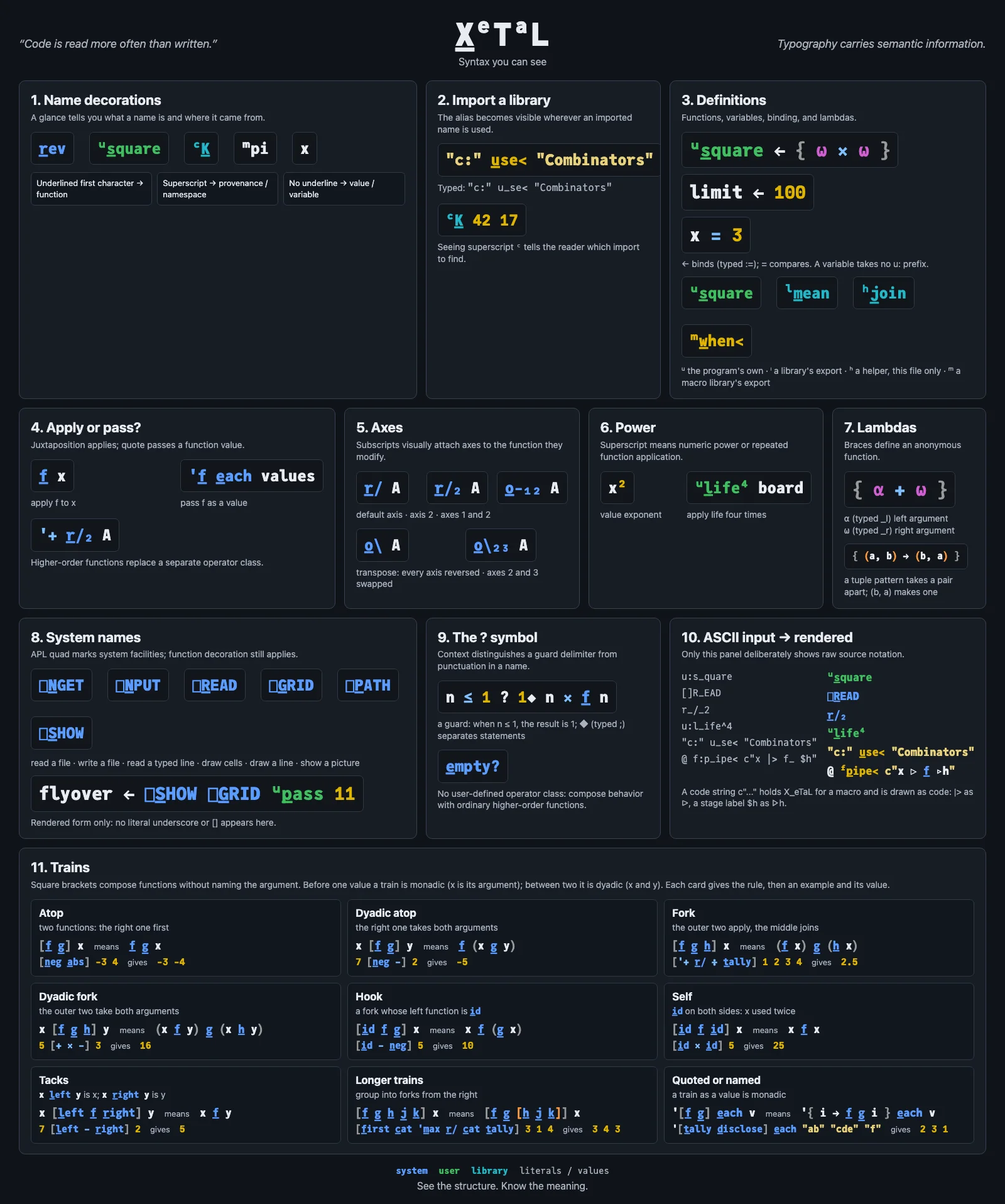
Episode 7 of my video series on array programming is about reading and writing X_eTaL. Episode 6 ended with a preview of it: the whole syntax, on one page. That page is X_eTaL’s syntax poster, and this post walks through it, panel by panel.
| Resource | Link |
|---|---|
| Video | Reading and Writing X_eTaL: the Syntax Poster, Panel by Panel: Array Languages #7 |
| The poster | X_eTaL: syntax you can see |
| All the videos | X_eTaL-video’s page |
| Try X_eTaL | In your browser |
| Code | X_eTaL, X_eTaL-video |
| Related posts | X_eTaL, an Array Language You Can Read, Small Comforts, X_eTaL’s Ergonomics, APL, J, K, BQN and X_eTaL |
| The series | Array Languages: every post |
| Comments | Discord |
Syntax you can see
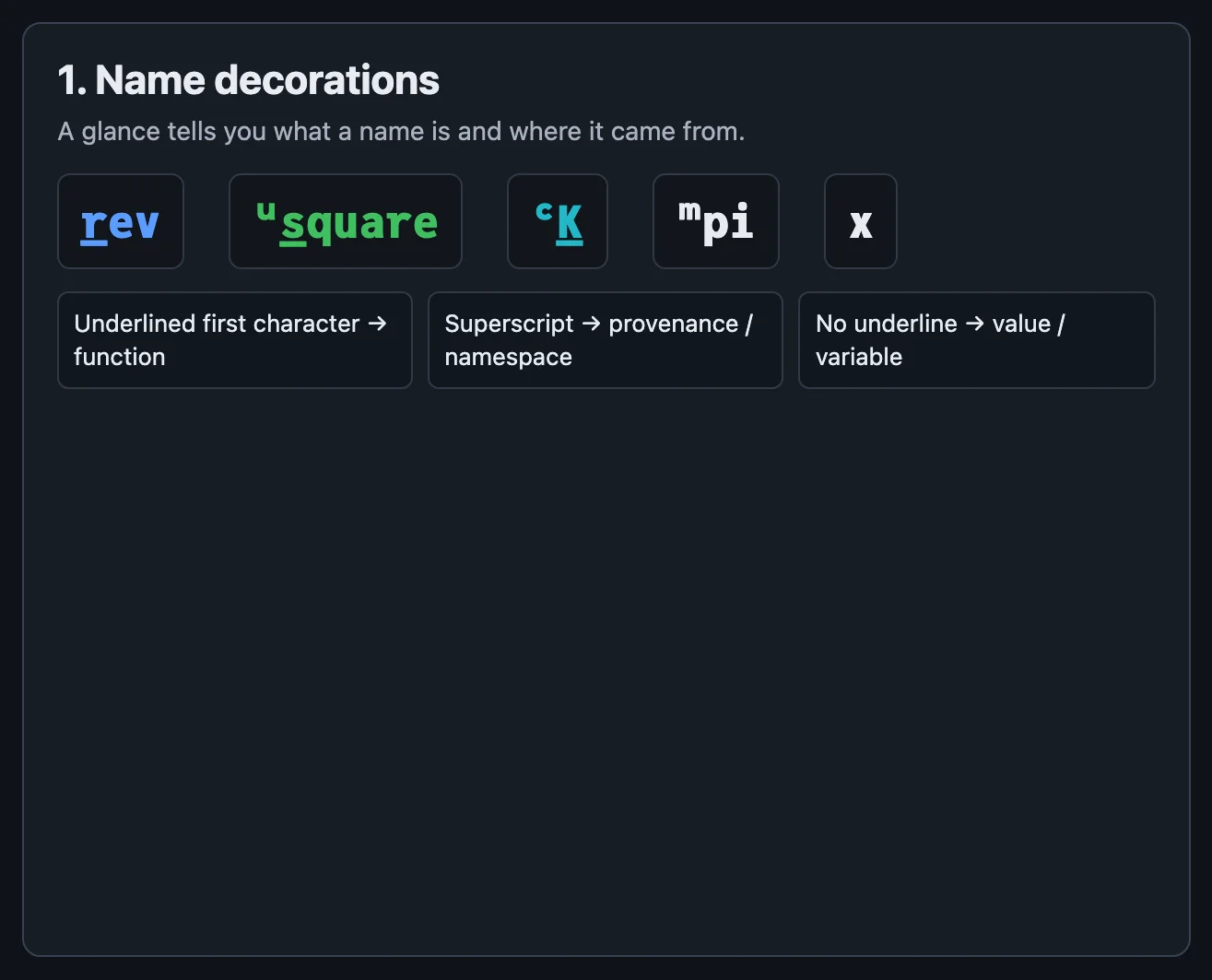
X_eTaL’s source is plain ASCII, typed on an ordinary keyboard. What you read is the same program drawn with typography: an underline, a raised letter, a lowered number. The decorations are not styling. Each one says something about the program, so a glance tells you what a name is, where it came from, and how it is used.
The poster puts all of it on one page, and every sample on it is drawn by X_eTaL itself, so it cannot drift from the language. Here it is in order.
Name decorations
A name’s decorations say what it is:
r̲ev                                                ⍝ underlined first letter: a function
ᵘs̲quare                                            ⍝ a raised prefix: where it came from
x                                                  ⍝ no underline: a value
r̲ev is a built-in function, reverse. ᵘs̲quare is a function too, and the raised ᵘ says it is this program’s own. x is a value. Color helps as well: built-ins are blue, the program’s own functions green, a library’s cyan.


Imports and definitions
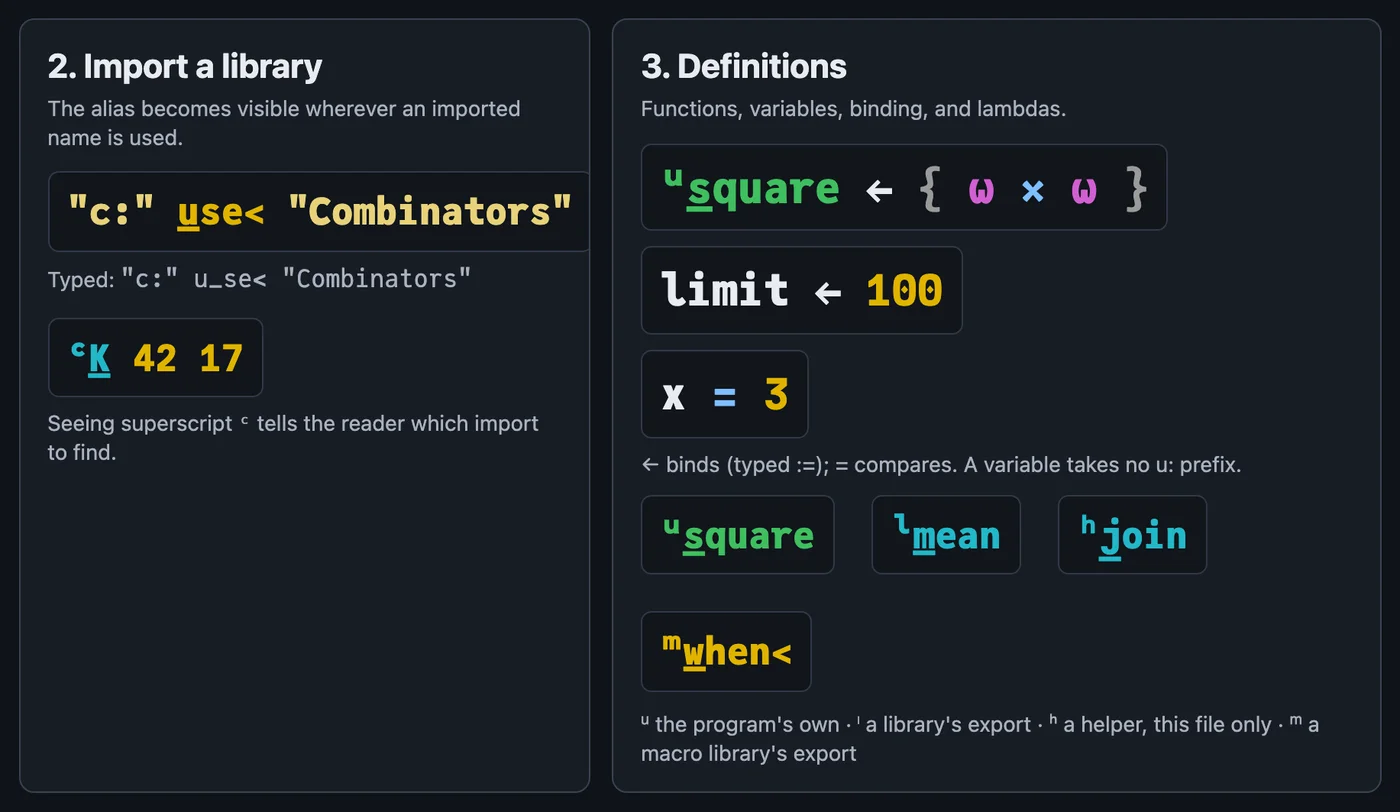
Importing a library picks the prefix its names will wear:
"c:" u̲se< "Combinators"
42 ᶜK̲ 17                                           ⍝ 42
The raised ᶜ on ᶜK̲ tells the reader which import to look in. K, the constant combinator, keeps its left argument.
u̲se< ends in <, and that mark makes it a macro. A macro runs before the program is checked: it takes text on each side and writes code in its place. X_eTaL has no keywords; even i̲f< is a macro, and f̲ormat< fills values into text. Code on a macro’s side goes in a code string, c"…", so it is drawn and checked as code (@, the unit, stands for a side that takes nothing):
x ← 5
c"x > 3" i̲f< c"1◆ 0"                               ⍝ 1
@ f̲ormat< "x = {x}"                                ⍝ x = 5
Definitions bind with an arrow, typed :=. A plain = compares:
ᵘs̲quare ← { ⍵ × ⍵ }
limit ← 100
x ← 3
ᵘs̲quare x                                          ⍝ 9
x = 3                                              ⍝ 1
3 = 3 4                                            ⍝ 1 0, one comparison per item
A function’s prefix says where it lives: ᵘs̲quare is the program’s own, ˡm̲ean a library’s export, ʰj̲oin a helper private to its file, and ᵐw̲hen< a macro library’s export. A variable takes no prefix.
A plain name is bound once: binding x again is refused before the program runs, with error[rebind]. A name that ends in ! is a variable. It may be bound again, but its type stays fixed, so text cannot replace a number. The same mark ends a function with an effect, such as p̲rint!:
count! ← 0
count! ← count! + 1
count!                                             ⍝ 1
Use variables sparingly. More often, pass the state through a pure function, as a tuple. Here a step takes a count and a running total and gives the next pair; four steps sum one to four, and nothing changes in place:
ᵘs̲tep ← { (n, t) → (n + 1, t + n) }
ᵘs̲tep⁴ (1, 0)                                      ⍝ (5, 10)
Apply or pass
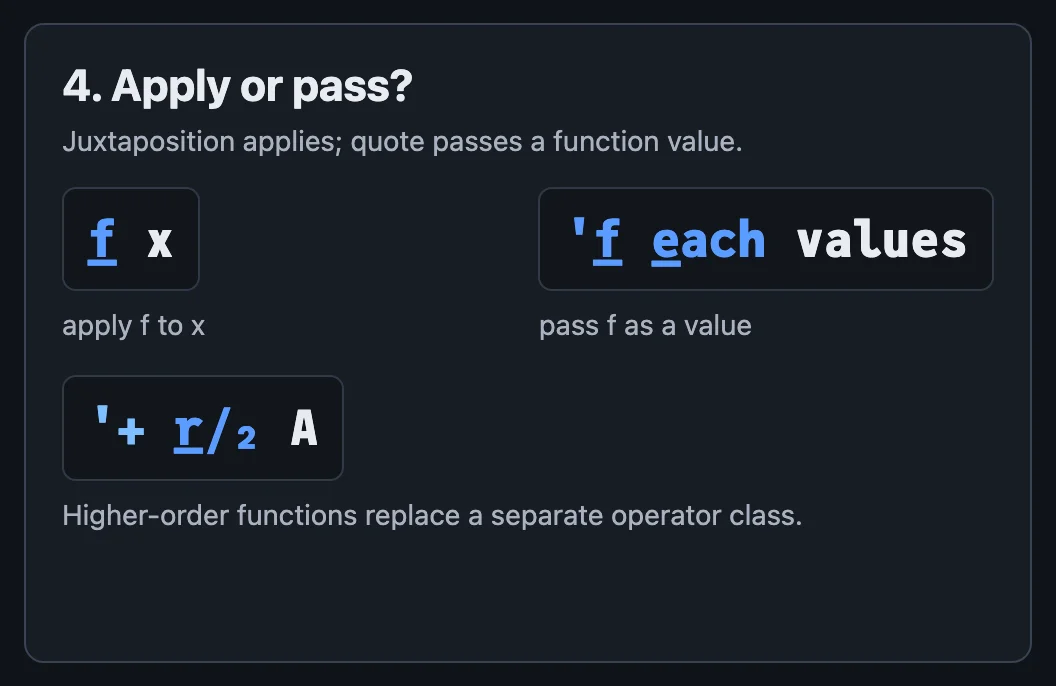
Writing a function before its argument applies it. Quoting it passes it as a value, to another function:
ᵘs̲quare x                                          ⍝ apply: 9
'ᵘs̲quare e̲ach 1 2 3                                ⍝ pass: 1 4 9
That one rule replaces APL’s separate class of operators. Reduce is an ordinary function that takes a function:
A ← 2 3 r̲eshape r̲ange 6
'+ r̲/ A                                            ⍝ 5 7 9
Axes and power
A subscript attaches an axis to the function it changes. Reduce works along the first axis by default; ₂ makes it work along the second:
'+ r̲/ A                                            ⍝ 5 7 9
'+ r̲/₂ A                                           ⍝ 6 15
The same subscript works for rotate: along axis 2, every row shifts by one. Transpose turns the rows into columns:
1 o̲-₂ A                                            ⍝ 2 3 1
                                                   ⍝ 5 6 4
o̲\ A                                               ⍝ 1 4
                                                   ⍝ 2 5
                                                   ⍝ 3 6
On more axes, transpose with no subscript reverses all of them; with two, it swaps just those:
B ← 2 3 4 r̲eshape r̲ange 24
s̲hape o̲\ B                                         ⍝ 4 3 2
s̲hape o̲\₂₃ B                                       ⍝ 2 4 3
A superscript is a power. On a value it is an exponent; on a function it means apply it that many times:
x²                                                 ⍝ 9
ᵘd̲ouble ← { 2 × ⍵ }
ᵘd̲ouble³ 1                                         ⍝ 8, doubled three times
ᵘl̲ife⁴ board                                       ⍝ life, four generations on
Lambdas, and the guard
Braces make an anonymous function. Its arguments are APL’s alpha and omega, ⍺ on the left and ⍵ on the right, typed _l and _r:
3 { ⍺ + ⍵ } 4 ⍝ 7
A lambda can name its argument, and a tuple pattern takes a pair apart:
{ (a, b) → (b, a) } (1, 2) ⍝ (2, 1)
The guard is ?. Before it, a condition; after it, the result when the condition holds; then ◆ (typed ;), and what to do otherwise:
ᵘf̲act ← { n → n ≤ 1 ? 1 ◆ n × ᵘf̲act n − 1 }
ᵘf̲act 5                                            ⍝ 120
Context tells the two uses of ? apart: at the end of a name, as in e̲mpty?, it is part of the name.
System names
APL’s quad marks the system’s own facilities: files, input, drawing. The function underline still applies:
⎕N̲GET ⍝ read a file
⎕N̲PUT writes one, ⎕R̲EAD reads a typed line, and ⎕G̲RID and ⎕S̲HOW draw. The quad is typed [].
ASCII in, drawn out
Everything above is what you read. Here is what you type:
| Typed | Drawn | Meaning |
|---|---|---|
r_ev |
r̲ev |
a function: the underscore follows the letter it underlines |
u:s_quare |
ᵘs̲quare |
a prefix before the colon is raised |
r_/_2 |
r̲/₂ |
an underscore and a number after the name: an axis |
u:l_ife^4 |
ᵘl̲ife⁴ |
a caret: a power |
[]R_EAD |
⎕R̲EAD |
brackets: the quad |
_l, _r |
⍺, ⍵ |
a lambda’s arguments |
:=, ; |
←, ◆ |
binding, and the statement separator |
The program is the ASCII; the drawing is a view of it. The browser editor shows both side by side, as you type.
Strings come in three kinds, and each is a list of characters, so t̲ally counts them. A plain string uses escapes, so a backslash is written twice. A raw string, r"…", keeps each backslash as typed. A code string, c"…", holds code: it is drawn as code and checked before the program runs, so c"1 +" is refused. Macros often take one:
t̲ally "a\\b"                                       ⍝ 3
t̲ally r"a\b"                                       ⍝ 3
c"1 + 2" m̲atch "1 + 2"                             ⍝ 1: the same characters
Every way to write a name
The decorations combine. Here is each form a name can take, typed and drawn, with what it gives. Every row was run; the setup each table assumes is above it.
Variables
| Drawn | Typed | Meaning | Gives |
|---|---|---|---|
x ← 5 |
x := 5 |
an immutable variable: bound once; binding it again is refused, error[rebind] |
|
y! ← 4 |
y! := 4 |
a mutable variable: the ! lets it be bound again |
|
y! ← y! + 1 |
y! := y! + 1 |
binding a mutable variable again; its type stays fixed, so text cannot replace a number | 5 |
k ← 'ᵘi̲nc³ |
k := 'u:i_nc^3 |
an immutable variable that holds a function; no underline, since it is a value | |
_ ← p̲rint! "hi" |
_ := p_rint! "hi" |
the discard: run for its effect, bound to nothing, never read | prints hi |
(w, _, _, z) ← (1, 2, 3, 4) |
(w, _, _, z) := (1, 2, 3, 4) |
a pattern binds two immutable variables, w and z; each _ skips a part, and may repeat |
w + z gives 5 |
ᵘpi ← 3.14 |
u:pi := 3.14 |
refused: a variable in your program takes no prefix, immutable or mutable (u:acc! := u:acc! + 1 likewise); constants shared across files come from a library, which exports them with l: |
error[bad-binding] |
Variable power
The exponent is a number literal, typed right after the caret with no space: a whole number, a decimal or a negative one. It cannot be a name or an expression: x^n and x^(1+1) are refused, and a computed exponent takes the spaced function instead, x ^ n. An Int base with a whole exponent of 0 or more gives an Int; a decimal or negative exponent gives a Float. Only the superscript converts the base: the spaced ^ is ordinary arithmetic, whose two sides must be the same number type, as with +.
With x ← 5, y! now 5, n ← 3 and r ← 2.25:
| Drawn | Typed | Meaning | Gives |
|---|---|---|---|
x³ |
x^3 |
x cubed | 125 |
y!² |
y!^2 |
a mutable variable squared; this reads y! and does not change it: y! is still 5 afterward |
25 |
x⁰ |
x^0 |
any base to the power 0 | 1 |
r⁰·⁵ |
r^0.5 |
a decimal exponent on a Float: the square root | 1.5 |
r⁻¹ |
r^-1 |
a negative exponent on a Float: the reciprocal | 0.444… |
x⁰·⁵ |
x^0.5 |
a decimal exponent on an Int gives a Float | 2.236… |
x⁻¹ |
x^-1 |
so does a negative one | 0.2 |
x ^ n |
x ^ n |
a computed exponent: the spaced ^ is the power function |
125 |
x ^ 0.5 |
x ^ 0.5 |
refused: an Int and a Float on the two sides of the spaced ^ |
error[type-mismatch] |
(f̲loat x) ^ 0.5 |
(f_loat x) ^ 0.5 |
convert the variable first; the parentheses matter | 2.236… |
f̲loat x ^ 0.5 |
f_loat x ^ 0.5 |
refused: read right to left, this is f̲loat (x ^ 0.5) |
error[type-mismatch] |
2 ^ 0.5 |
2 ^ 0.5 |
a whole-number literal is an Int or a Float, as its use needs, so 2 becomes a Float |
1.414… |
Function definitions
| Drawn | Typed | Meaning |
|---|---|---|
ᵘf̲ ← { 1 o̲- ⍵ } |
u:f_ := { 1 o_- _r } |
your function, rotate by one; ⍵, typed _r, is its argument; pure unless it calls an effect, which xetal lint reports as missing-bang |
ᵘf̲! ← { p̲rint! "step"◆ 1 o̲- ⍵ } |
u:f_! := { p_rint! "step"; 1 o_- _r } |
your function with an effect: the same rotate, printing as it goes |
ᵘi̲nc ← { x → x + 1 } |
u:i_nc := { x -> x + 1 } |
a function that names its argument |
ᵘp̲lus ← { ⍺ + ⍵ } |
u:p_lus := { _l + _r } |
two arguments, unnamed: ⍺ (typed _l) on the left, ⍵ (typed _r) on the right; a lambda that uses ⍺ must use ⍵ too; 3 ᵘp̲lus 4 gives 7 |
ᵘa̲dd ← { a b → a + b } |
u:a_dd := { a b -> a + b } |
two arguments, named; 3 ᵘa̲dd 4 gives 7 |
ᵘf̲irst ← { (a, _) → a } |
u:f_irst := { (a, _) -> a } |
a tuple pattern takes a pair apart; _ ignores its part, and is allowed only in a pattern ({ _ → 1 } is refused); ᵘf̲irst (1, 2) gives 1 |
ᵘc̲onst ← { ▁ → 42 } |
u:c_onst := { _u -> 42 } |
a function that ignores its only argument: _u, drawn ▁, marks a parameter nothing reads, so lint stays quiet (naming it x gets unused-binding), and reading it in the body is refused; ᵘc̲onst 7 gives 42 |
ᵘo̲r ← { a ~b → a ? 1◆ b } |
u:o_r := { a ~b -> a ? 1; b } |
a ~ before a parameter makes it lazy: its argument is evaluated on first use, and never if unused. The call looks the same: 1 ᵘo̲r p̲rint! 0 gives 1 and prints nothing; 0 ᵘo̲r p̲rint! 0 prints 0, then gives it. Without the ~, the first call prints too |
ᵘi̲gnore ← { ~▁ → 42 } |
u:i_gnore := { ~_u -> 42 } |
ignored and lazy: the argument is never evaluated, so ᵘi̲gnore p̲rint! "never" prints nothing and gives 42 |
ᵘn̲ow! ← { @ → p̲rint! "tick"◆ 0 } |
u:n_ow! := { @ -> p_rint! "tick"; 0 } |
a function of no argument: @ takes only the unit value, so it is called as ᵘn̲ow! @ |
ᵘw̲hole? ← [i̲d = [f̲loat f̲loor]] |
u:w_hole? := [i_d = [f_loat f_loor]] |
a ? at the end is part of the name: by custom, a yes-or-no test |
Function applications
With the definitions above, M ← 2 4 r̲eshape r̲ange 8 (rows 1 2 3 4 and 5 6 7 8), and B ← 2 3 4 r̲eshape r̲ange 24:
| Drawn | Typed | Meaning | Gives |
|---|---|---|---|
ᵘf̲ 1 2 3 4 |
u:f_ 1 2 3 4 |
apply your function | 2 3 4 1 |
ᵘf̲! 1 2 3 4 |
u:f_! 1 2 3 4 |
apply your effect function | prints step; 2 3 4 1 |
ᵘf̲₁ M |
u:f__1 M |
along axis 1, the default | rows 5 6 7 8, 1 2 3 4 |
ᵘf̲₂ M |
u:f__2 M |
along axis 2: that axis is moved to the front, f applied, and moved back | rows 2 3 4 1, 6 7 8 5 |
ᵘf̲³ 1 2 3 4 |
u:f_^3 1 2 3 4 |
applied three times | 4 1 2 3 |
ᵘf̲!₂³ M |
u:f_!_2^3 M |
the effect function, along axis 2, three times | prints step three times; rows 4 1 2 3, 8 5 6 7 |
ᵘw̲hole? 2.5 3 |
u:w_hole? 2.5 3 |
a test, applied | 0 1 |
ᵘi̲gnore 1 ÷ 0 |
u:i_gnore 1 / 0 |
a lazy, ignored argument is never evaluated, so the division by zero never happens | 42 |
ᵘc̲onst 1 ÷ 0 |
u:c_onst 1 / 0 |
the same with a strict parameter: the argument is evaluated first, though nothing reads it | error[division-by-zero] |
'ᵘi̲nc e̲ach 1 2 3 |
'u:i_nc e_ach 1 2 3 |
quoted: the function itself, passed as a value | 2 3 4 |
'ᵘi̲nc³ e̲ach 1 2 3 |
'u:i_nc^3 e_ach 1 2 3 |
a quoted power: three times, on each item | 4 5 6 |
(̲k)̲ 10 |
(k)_ 10 |
apply the function a variable holds | 13 |
n 'ᵘi̲nc p̲ower 10 |
n 'u:i_nc p_ower 10 |
a count computed while the program runs, with n ← 2 + 2 |
14 |
'+ r̲/₂ M |
'+ r_/_2 M |
an axis on a function that takes a function | 10 26 |
s̲hape o̲\₂₃ B |
s_hape o_\_23 B |
two axes, only where the function defines them, as transpose does | 2 4 3 |
(0.1 + 0.2) e̲q~ 0.3 |
(0.1 + 0.2) e_q~ 0.3 |
a ~ at the end of a name is part of it: tolerant equality, where = is exact and gives 0 |
1 |
r̲ev 1 2 3 |
r_ev 1 2 3 |
a built-in: no prefix | 3 2 1 |
42 ᶜK̲ 17 |
42 c:K_ 17 |
a function from a library imported as c: |
42 |
A superscript power goes only on a name, written as a literal whole number (p̲ower takes any count). It repeats a one-argument function, so +⁴ is refused: + takes two. On your own function a single axis always works; two axes, as ᵘf̲₁₂, are refused.
Macro definitions
A macro lives in a macro library, a .xtlm file, where its name wears ᵐ. Zee, the file Zee.xtlm, holds one:
⍝│ The list on the left plus the expression on the right.
⍝│ takes: code code
ᵐf̲oo< ← { a b → "(" c̲at a c̲at ") + (" c̲at b c̲at ")" }
| Drawn | Typed | Meaning |
|---|---|---|
ᵐf̲oo< ← { a b → … } |
m:f_oo< := { a b -> ... } |
a macro: the trailing < marks it; it takes text on each side and gives code |
A program cannot yet define a macro of its own, as ᵘf̲oo<; that design is deferred.
Macro usage
| Drawn | Typed | Meaning | Gives |
|---|---|---|---|
"zee:" u̲se< "Zee" |
"zee:" u_se< "Zee" |
import the macro library Zee, choosing the prefix zee:; a prefix may be longer than one letter, and is drawn raised just the same |
|
"1 2 3" ᶻᵉᵉf̲oo< "1 + 1" |
"1 2 3" zee:f_oo< "1 + 1" |
call its macro with plain strings; the code it writes runs in its place. It works, but since Zee declares takes: code code, lint suggests code strings (string-kind) |
3 4 5 |
c"1 2 3" ᶻᵉᵉf̲oo< c"1 + 1" |
c"1 2 3" zee:f_oo< c"1 + 1" |
the same with code strings, which are checked before the program runs | 3 4 5 |
c"x > 3" i̲f< c"1◆ 0" |
c"x > 3" i_f< c"1; 0" |
a system macro: no prefix (u̲se< is one too) |
1 |
The underscore
A keyboard has no key for an underline, a subscript or the APL glyphs, so X_eTaL’s ASCII spells several of them with one key, _. Its meaning depends on where it stands. In the drawn form most underscores turn into a mark and disappear, so a reader of the drawing never sees them. You still type them, though, and the ASCII is what shows up wherever the drawing does not: a git diff, a plain terminal, a search with grep, the source an error message quotes. This table maps each place an underscore can stand to what it does:
| Typed | Drawn | Meaning |
|---|---|---|
r_ev |
r̲ev |
after a name’s first letter, it underlines that letter: the name is a function. A function name has exactly one, on its first letter; a later letter, as in u:ab_c, still runs for now, but lint warns underline-not-first, and it is to become an error |
[]R_EAD |
⎕R̲EAD |
the same underline, in a system name |
u:f__2 M |
ᵘf̲₂ M |
a second underscore, then digits: an axis |
'+ r_/_2 M |
'+ r̲/₂ M |
the same on a symbol: the first underscore underlines r, the second starts the axis |
u:l_og2 1 2 3 |
ᵘl̲og2 1 2 3 |
digits with no second underscore are part of the name, log2; gives 3 2 1 with ᵘl̲og2 ← { r̲ev ⍵ } |
u:l_og2_2 M |
ᵘl̲og2₂ M |
that name on axis 2; u:l_og_2 would be a function named log on axis 2 |
_l, _r |
⍺, ⍵ |
a lambda’s left and right arguments |
{ _u -> 42 } |
{ ▁ → 42 } |
a parameter nothing reads, so lint stays quiet |
_ := p_rint! "hi" |
_ ← p̲rint! "hi" |
the discard: a value computed for its effect and dropped |
(w, _, _, z) := s |
(w, _, _, z) ← s |
in a pattern, it skips a part; it may repeat, and works in a lambda’s pattern too |
(k)_ 10 |
(̲k)̲ 10 |
after a closing parenthesis: apply the function the expression gives |
_ + x |
anywhere else, a bare underscore is refused: _ is never read |
Trains
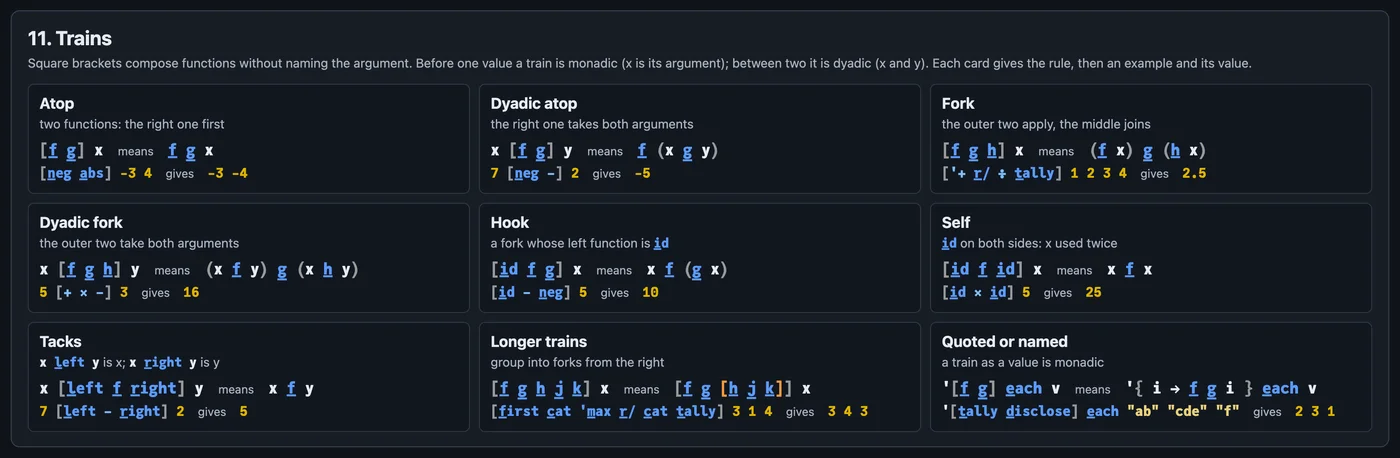
Square brackets compose functions without naming the argument: a train, as in APL, J and BQN. Before one value a train is monadic; between two, dyadic. The rule for each shape, and an example of each, run:
| Train | Means | Example |
|---|---|---|
| Atop | [f̲ g̲] x is f̲ g̲ x |
[n̲eg a̲bs] -3 4 gives -3 -4 |
| Dyadic atop | x [f̲ g̲] y is f̲ (x g̲ y) |
7 [n̲eg −] 2 gives -5 |
| Fork | [f̲ g̲ h̲] x is (f̲ x) g̲ (h̲ x) |
['+ r̲/ ÷ t̲ally] 1 2 3 4 gives 2.5 |
| Dyadic fork | x [f̲ g̲ h̲] y is (x f̲ y) g̲ (x h̲ y) |
5 [+ × −] 3 gives 16 |
| Hook | [i̲d f̲ g̲] x is x f̲ (g̲ x) |
[i̲d − n̲eg] 5 gives 10 |
| Self | [i̲d f̲ i̲d] x is x f̲ x |
[i̲d × i̲d] 5 gives 25 |
| Tacks | x [l̲eft f̲ r̲ight] y is x f̲ y |
7 [l̲eft − r̲ight] 2 gives 5 |
| Longer | forks grouped from the right | [f̲irst c̲at 'm̲ax r̲/ c̲at t̲ally] 3 1 4 gives 3 4 3 |
| Quoted | a train passed as a value is monadic | '[t̲ally d̲isclose] e̲ach "ab" "cde" "f" gives 2 3 1 |
X_eTaL has no separate hook rule, as J does. In J, two functions in a row are a hook: (f g) y is y f (g y). In X_eTaL, two functions in brackets are an atop, and a hook is written as a fork whose left function is identity, i̲d. J’s classic hook divides each item by the total:
(% +/) 1 2 3 4 J: 0.1 0.2 0.3 0.4
[i̲d ÷ '+ r̲/] 1 2 3 4 ⍝ 0.1 0.2 0.3 0.4
The second way uses the Combinators library. Its Starling, S x y z = x z (y z), is J’s hook as a function: its argument is used twice, once as it is and once through the other function. The functions go in quoted, the nearest one first, so '÷ is the joining function and the sum is applied first. The sum gets a name, since a function passed this way is quoted by name:
"c:" u̲se< "Combinators"
ᵘs̲um ← { '+ r̲/ ⍵ }
'ᵘs̲um '÷ ᶜS̲ 1 2 3 4                                ⍝ 0.1 0.2 0.3 0.4
'n̲eg '− ᶜS̲ 3                                       ⍝ 6, that is 3 − (n̲eg 3)
A third hook shows the types at work. J’s (= <.) asks which items are whole numbers: each one compared with its floor. Written the same way, X_eTaL refuses it before it runs:
(= <.) 2.5 3 4.25 J: 0 1 0
[i̲d = f̲loor] 2.5 3 4.25
error[type-mismatch]: expected Int, found Float
  = help: Int and Float do not mix: `f_loat n` makes a Float of an Int,
          `f_loor x` or `c_eiling x` an Int of a Float
f̲loor gives an integer, and an integer is never compared with a float without saying so. As the help says, f̲loat turns the floor back into a float; an inner atop, [f̲loat f̲loor], applies it after the floor:
ᵘw̲hole? ← [i̲d = [f̲loat f̲loor]]
ᵘw̲hole? 2.5 3 4.25                                 ⍝ 0 1 0
The inner brackets matter: without them the four functions group as a longer train, and X_eTaL refuses that too, pointing at the function that would be given two arguments.
Closing
The best way to learn to read X_eTaL is to type it. Open the syntax poster, pick three panels, and type each sample into X_eTaL in your browser. Type the ASCII and watch it turn into the drawn form as you go. The tables above are there for when a name looks strange.
Writing this post and making the video turned up several places where X_eTaL didn’t do what the poster said, or gave an error message less helpful than it should have been. Those are fixed now, and every example here runs on the current X_eTaL. Explaining a language, one panel at a time, turned out to be a good way to test it.
Part 27 of the Array Languages series. View all parts
Comments or questions? SW Lab Discord or YouTube @SoftwareWrighter.