
Why I Use #8: fd, ripgrep, skim, dua and bat --- Rust at the Prompt
2203 words • 12 min read • Abstract
The prior post was about getting to a prompt and keeping it. This one is about five commands I type at it, all written in Rust, and how they combine. Three of them, fd, ripgrep and dua, take the place of GNU tools from #5 at my command line, and each is better at the job I actually have, which is usually searching a source tree. The other two work alongside them: skim, a fuzzy finder in the style of fzf, and bat, which takes the place of cat.
| Resource | Link |
|---|---|
| fd | github.com/sharkdp/fd |
| ripgrep | github.com/BurntSushi/ripgrep |
| skim | github.com/skim-rs/skim |
| dua | github.com/Byron/dua-cli |
| bat | github.com/sharkdp/bat |
| Why Rust | Why I Use #1: Rust |
| The GNU originals | Why I Use #5: GNU Tools |
| The series | Why I Use: every post |
| Comments | Discord |
Not instead of GNU, beside it
I still install GNU’s find, grep and du, and scripts still use them, because they are everywhere and their options are a standard. I do not require the AI coding agents that write scripts for me to use the Rust alternatives. At the command line, though, I prefer the Rust commands, because they are faster for me. Their defaults are chosen for someone searching code, so the common case needs no options at all.
fd: find, the way I mean it
fd finds files by name. Where find . -name '*.rs' needs a path, a test and quoting, fd -e rs does the same search. By default it skips hidden files and anything listed in .gitignore, so a search of a Rust project does not wade through target/, and it searches by regular expression with colored output.
fd -e rs              # every Rust source file in this project
fd Cargo.toml         # every crate
fd -e md -x wc -w     # word count of every Markdown file, in parallel
fd was one of the commands I was typing too often when I wrote pjmai-rs: with 200 repositories spread differently across each machine, I was spending too much time with cd, du, fd and ls just to find where a project was.
My most frequent use of fd is just fd, with no arguments, in place of du -a: it lists every file under the current directory, and it has the advantage of skipping what .gitignore already says to ignore.
ripgrep: grep for source trees
ripgrep, rg, searches file contents. It is recursive by default and, like fd, skips hidden files, binary files and whatever .gitignore excludes, so rg pattern in a project searches the project and not its build output.
rg 'fn main'          # every main in the project
rg -t rust unsafe     # only in Rust files
rg -l TODO            # just the names of files with a TODO
My usual search is in Rust files only:
rg -t rust Hello                                    # rg
find . -name "*.rs" -exec grep Hello {} \; -print   # the same search without it
The rg line is shorter, and it does more. It skips whatever .gitignore excludes, so a match in a copy under target/ does not show up, and it prints the file name and line number with each match. The find line searches the ignored files too. It runs one grep per file, and the -print at the end names a file only after its matching lines, because -exec counts as true only when grep found something.
skim: pick one as you type
skim, whose command is sk, is a fuzzy finder: give it a list of lines, type a few letters in any order, and it narrows the list as you type until the one you want is at the top. It is a Rust implementation in the style of fzf, which is written in Go. I found fzf useful, but after using fd and rg, both in Rust, I looked for a Rust alternative to fzf, partly to support the Rust community, and switched to skim. It does not replace find or xargs; it sits between them. fd or find produces the list, skim picks from it, and xargs or any other command acts on the pick:
fd -e rs | sk              # pick a Rust file by a few letters of its name
rg -l TODO | sk            # pick one of the files with a TODO
fd -e rs | sk -m | xargs wc -l   # line counts for just the files I mark
Fuzzy matching is also how pjmai-rs completes project names: type part of a name and the closest match wins.
I run skim with a preview:
sk --preview "bat --color=always --style=numbers --line-range=:500 {}"
skim lists the files under the current directory, and as I move through them, the preview pane shows the one under the cursor. {} is that file. The preview is bat, below: --color=always keeps the syntax highlighting even though bat is writing to skim rather than a terminal, --style=numbers keeps the line numbers and drops the rest of its decoration, and --line-range=:500 stops after the first 500 lines so a large file does not slow the preview down.
dua: where did the disk go?
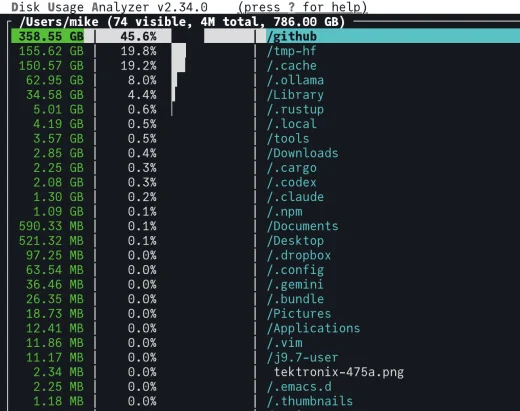
dua, for disk usage analyzer, does more than du. It answers what du does, sorted so the biggest offenders are obvious, and its interactive mode, dua i, lets me browse the tree by size, mark what to delete, and delete it, without composing an rm by hand.
Before dua, I found large files with du -ah, grep for the sizes in megabytes or gigabytes, and sort, something like:
du -ah | grep -E '^ *[0-9.]+[MG]' | sort -h
I also used desktop apps bought from the Mac App Store, and they were clunky and very slow. dua is very fast, and ergonomic.
I use it to find space I can free. Mainly that is any Rust target/ directory, since a build recreates it easily; sometimes it is cache directories, sometimes downloads, and sometimes large data files from old projects.
bat: cat, for reading
cat concatenates files; most of the time I use it to read one. bat, from the author of fd, is built for reading: syntax highlighting, line numbers, markers in the margin for lines changed since the last git commit, and a pager for anything longer than the screen. When its output goes to a pipe or a file instead of a terminal, it drops all of that and behaves like plain cat, so it is safe in the middle of a pipeline.
bat src/main.rs           # highlighted, numbered, paged
bat -r 40:60 src/main.rs  # just lines 40 to 60
bat -A README.md          # show tabs, line endings and other invisible characters
That last one is the check markdown-checker automates: characters you cannot see that stop a README rendering.
One place I use bat is as skim’s preview, above. I also use it on its own, here on my Mac:
% bat hello_rust/src/main.rs
─────┬────────────────────────────────────────────────
     │ File: hello_rust/src/main.rs
─────┼────────────────────────────────────────────────
   1 │ fn main() {
   2 │     println!("Hello, world!");
   3 │ }
In the terminal the code is syntax highlighted too.
Together
Each of these does one job, and their output is plain lines, so they pipe into each other: fd and ripgrep produce lists, skim picks from a list, bat shows what is picked, and xargs or any other command acts on it.
Pick a file by a few letters of its name, then open it:
$EDITOR "$(fd -e rs | sk)"
Search with ripgrep, choose among the matches, and preview each one in bat with the matching line highlighted. This one is straight from skim’s own help:
rg --line-number TODO |
  sk --delimiter : \
     --preview 'bat --style=numbers --color=always --highlight-line {2} {1}' \
     --preview-window +{2}-/2
Live grep: skim reruns ripgrep with whatever has been typed so far, on every keystroke:
sk --ansi -i -c 'rg --color=always --line-number "{}"'
Mark several, then act on all of them:
rg -l TODO | sk -m | xargs wc -l
And where the disk went. Every Rust project leaves a target/ directory of build output, and because target/ is in .gitignore, fd skips it by default. -I turns that off, and dua sizes what it finds:
fd -t d -I '^target$' ~/github | xargs dua
Without -I, under one directory of my repositories, that found nothing. With it, it found two target/ directories holding 1.38 GB.
How I install them
I sometimes use Homebrew to install utilities, but if I know a utility is written in Rust, I often install it with cargo install instead. On Arch I use pacman, yay for packages from the AUR, or cargo.
On the Mac, fd and dua came from cargo install, and ripgrep from Homebrew (with a second copy in ~/.cargo/bin behind it on the PATH). skim and fzf are on the Arch machines, and on the Mac from Homebrew (brew install sk fzf).
And two more
- just, a command runner: a
justfileof named recipes instead of a Makefile’s build rules. I use it in most new projects, such as my X_eTaL repositories. - For
cd, not zoxide but my own pjmai-rs:chpjto jump to a project, andpspjandpopjto push and pop, alongside plaincd.
Each of these started as a command I was tired of typing the long way: find with its quoting, grep -r through build output, du piped through grep and sort. The Rust versions are what I reach for now, and installing them with cargo is one more reason I keep Rust on every machine.
Part 8 of the Why I Use series. View all parts
Comments or questions? SW Lab Discord or YouTube @SoftwareWrighter.